
September 2026

More Control Over Your Home Energy: Inside the Fortress Power Owner App

Your home energy system is doing a lot behind the scenes. Solar is producing power. Your battery is storing energy for later. Your home is constantly drawing what it needs. But as a homeowner, you shouldn’t have to guess what’s happening.

The Fortress Power Owner App puts that information right on your phone. This gives you an easier way to monitor your solar and battery storage system, manage supported settings, and stay connected to your energy use.

Whether you want to see how much energy your battery has available, check in on your system while you’re away, or simply better understand how your home is using energy, the Owner App keeps the information that matters within reach.

See Your Home Energy In Real Time

One of the biggest benefits of a connected home energy storage system is visibility. With the Owner App, homeowners can see what’s happening across their system without having to interact directly with the equipment. You can check battery status, monitor solar production, and see how energy is moving throughout your home.

That makes it easier to answer the questions that naturally come with owning solar and battery storage: How much energy is stored in my battery?’

Is my solar system producing right now? How is my home using energy? What is my system doing with the power being generated?

Instead of treating your battery as a piece of equipment that operates in the background, the app gives you a clearer view of how your home energy system is working throughout the day.

Manage Your Energy from Your Phone

Monitoring is only part of the experience. The app also gives homeowners access to supported system settings, making it easier to manage how their home energy storage system operates.

The interface is designed to clearly explain available settings and their impact. Making an adjustment doesn’t require you to become an energy storage expert. Your priorities may also change. You might want to make greater use of stored solar energy during normal operation or keep more battery capacity available for backup. Having access to your system from your phone makes it easier to stay involved in how your energy is managed.

When you need additional help, you don’t have to figure everything out yourself. Your installer or the Fortress Power technical support team can remotely assist with supported settings through the Fortress Power Pro App.

Get Support Without Starting from Scratch

When something doesn’t look right, explaining exactly what your energy system is doing can be difficult.The Owner App helps simplify that process with a built-in reporting feature that allows homeowners to contact Fortress Power technical support directly through the app.

On supported devices, you can even shake your phone to quickly submit a support report. That connection can give the support team useful system information for troubleshooting, helping create a more direct path between the homeowner, their system, and the people supporting it.

Your Home Battery Can Do More Than Provide Backup Power

Home battery storage is changing. For many homeowners, the value of a battery starts with storing solar energy and having power available during an outage. Connected batteries can also create opportunities to participate in programs that support the larger electrical grid.

Virtual Power Plants (VPPs) bring groups of connected energy resources together so they can respond when the grid needs additional support. Depending on program and location, participating homeowners may have opportunities to earn incentives or receive other benefits for making a portion of their stored energy available during certain events.

Fortress Power is expanding these opportunities through EnergyBroker, connecting eligible homeowners and Fortress Power systems with participating energy programs. Enrollment in EnergyBroker or VPP programs is not currently available directly through app, but this functionality is planned for a future update.

Explore EnergyBroker and Virtual Power Plant opportunities →

Built for Fortress Power Homeowners

The Fortress Power Owner App works exclusively with compatible Fortress Power batteries, inverters, and accessories running Fortress Power software, creating a connected experience between your equipment and the tools used to monitor it.

The app is available for iOS and Android smartphones and currently supports both English and Spanish. Tablets are also supported, although the app is not currently optimized as a native tablet experience.

Install Faster + Monitor Smarter | Fortress Power App & Portal Demo (Webinar Replay)


Your Energy System Shouldn’t Be A Mystery

Home energy storage isn’t only about what’s installed on the wall. It’s also about how easily you can understand and interact with that system after installation.

The Fortress Power Owner App gives homeowners a clearer view of their solar and battery storage, convenient access to supported controls, and a direct connection to support when assistance is needed. As capabilities such as EnergyBroker and VPP participation continue to expand, the connected experience can create even more ways for homeowners to get value from their energy storage systems.

Your home is producing, storing, and using energy every day. The Owner App helps you see what’s happening — and puts more control in your hands.

Already have a compatible Fortress Power system? Download the app for iOS or Android and stay connected to your home energy.

Integrating Battery Storage With an Existing Commercial Generator

Adding battery energy storage to an existing commercial site rarely means starting from scratch. Many facilities already have backup generators in place. Not to mention, those generators may have been sized years before battery storage was ever part of the energy strategy.

For installers, that creates an important design question: How will the existing generator work with the new battery energy storage system? The answer can affect more than backup power. Generator size, connection points, battery charging, existing solar and the site’s overall control strategy all influence the best approach.

Start with the Existing Generator

One of the first considerations is whether the site’s generator can be connected directly to the battery system. With the Fortress Power eSpire Nano, a generator can be integrated through the inverter’s Smart Port, allowing it to support backed-up loads and charge the battery during an outage.

For many installations, that provides a straightforward path to generator integration. But existing commercial generators aren’t always sized around the limits of a new energy storage system. A facility may already have a larger generator capable of supplying significantly more power than the Nano’s Smart Port can accept. In that situation, simply connecting the generator to the inverter may leave some of that existing capacity unused.

When an External ATS Makes Sense

For sites with larger existing generators, the design can be expanded using an external automatic transfer switch (ATS).

Rather than routing the generator directly through the Smart Port, the generator can be integrated upstream of the eSpire Nano inverter. With Nano Pro and the Keystone EMS Controller, this configuration can provide up to twice the generator input available through the Smart Port alone while allowing the generator to support backed-up loads and battery charging.

There is another advantage: the Smart Port remains available. That gives installers more flexibility to use it for another site asset, such as AC-coupled PV or a controllable load, instead of requiring the generator to occupy that connection.

Bringing Solar, Storage and Generation Together

Generator integration becomes even more important when the site also has solar. A commercial facility may need the battery to provide backup, the generator to support longer outages and PV to continue contributing energy when it is available. Managing each asset independently can make the system more difficult to design, monitor and operate.

This is where Keystone EMS becomes an important part of the eSpire Nano Pro architecture. The controller can communicate with third-party distributed energy resources. It brings their operation into a broader site-level strategy. In a Nano Pro configuration, that may include the battery, generator, PV, loads and other supported assets.

Instead of viewing the generator as a separate backup asset, installers can design it as part of the site’s overall energy system.

One System, One View of Site Operations

Bringing multiple energy assets together is only part of the equation. Installers also need a way to understand how those assets are operating as a system. With Nano Pro & Keystone EMS, generator, PV, battery and site load data can be brought into a unified monitoring platform. This gives installers and system owners greater visibility into how energy is moving across the site rather than requiring them to monitor each asset separately.

That visibility becomes especially valuable during backup operation. The system can coordinate available resources based on site conditions. This helps determine when stored energy is used, when the generator is needed and how available PV contributes to the site’s loads. For commercial sites with multiple energy resources, the result is a more coordinated approach to backup power. Additionally, a clearer picture of how the entire system is performing.

YouTube video player

More Flexibility for Commercial Retrofits

Existing commercial sites don’t always fit neatly into a standard system design. The generator may be larger than expected. Solar may already be installed. The customer may want battery charging during an outage. Or the site may need to preserve the Smart Port for another asset.

The eSpire Nano provides a straightforward path for basic generator integration, while Nano Pro with Keystone EMS gives installers additional options when the site’s existing equipment or energy strategy requires more advanced coordination. For installers working on commercial retrofits, that flexibility can make it easier to work with the assets already on site rather than designing the storage system around unnecessary limitations.

Working on a commercial site with existing generation? Talk to Fortress Power about the site’s existing equipment and energy goals to determine the right eSpire Nano configuration.

What Sets the eSpire Nano Apart From Other Three-Phase Energy Storage Solutions

As more installers move into commercial energy storage, the number of three-phase solutions on the market continues to grow. At first glance, many systems can look similar. They may offer comparable inverter sizes, battery capacities and backup capabilities.

For installers, the differences often show up in everything surrounding the hardware. For example, how quickly the system can be deployed, how easily it can integrate with existing site assets, how much control it provides, and what support is available when the project becomes more complex. That is where the Fortress Power eSpire Nano is designed to stand apart.

More Flexibility Across Commercial Sites

The eSpire Nano supports 208V, 220V, 240V and 480V three-phase applications. This includes 30 kW and 60 kW inverter options, along with 40 kWh or 60 kWh battery configurations.

Installers have more flexibility when working across small- to mid-sized commercial sites without moving immediately into a much larger C&I platform. The system also supports both AC and DC coupling, making it suitable for new installations as well as sites with existing PV.

Faster, Simpler Commissioning

Commercial energy storage does not have to mean a long, complicated commissioning process. The Nano was designed around residential-speed commissioning, with system commissioning in under ten minutes. This is a core differentiator compared with other three-phase hybrid solutions. For installers, that can translate into less time spent getting the system online and a more repeatable process across projects.

Built for More Than Basic Battery Operation

The eSpire Nano can be deployed as a Standard system for more straightforward applications, but Fortress Power also offers Nano Pro powered by Keystone EMS when the site requires more advanced control.

Keystone EMS brings together monitoring, control and optimization across the battery system and other site assets, including PV, generators, EV charging and additional distributed energy resources. That gives installers a path to handle more sophisticated applications without changing to an entirely different platform.

More Advanced Control When the Site Requires It

With Nano Pro, Keystone EMS expands the system beyond manually scheduled battery operation.

Pro supports predictive peak shaving using 15-minute interval data. Additionally, more advanced time-of-use optimization, utility-program support, savings and performance reporting, and applications involving multiple meters or larger feeders. It also enables more advanced PV and generator integration.

For example, communications-based PV control allows AC-coupled PV to remain available during backup while keeping the Smart Port open for another asset. An external ATS can also increase available generator input while preserving additional site flexibility. That matters because commercial sites rarely stay simple forever.

YouTube video player

Compare More Than Power and Capacity

When comparing three-phase hybrid energy storage solutions, power and capacity are only part of the decision. Installers should also consider commissioning, voltage flexibility, PV and generator integration. Not to mention, energy management capabilities, and the level of support available as projects become more complex.

Rather than requiring installers to choose between a simpler system and one capable of handling more advanced applications, Nano provides a platform that can grow with the needs of the site. Standard covers the core capabilities many commercial installations require, while Nano Pro and Keystone EMS extend that platform into more advanced energy management and asset control.

For installers expanding into C&I, that means one system with more room to take on different types of commercial applications — backed by Fortress Power from system design through installation and ongoing operation.

Have a C&I project in the pipeline? Talk to Fortress Power about whether eSpire Nano is the right fit.

When Does a Commercial Energy Storage Project Need an Advanced EMS?

Installing a commercial battery is only one part of managing energy across a facility.

As commercial sites add solar, battery storage, generators, EV chargers, and other distributed energy resources, deciding when and how each asset should operate becomes increasingly important. Utility rate structures, demand peaks, backup requirements, and changing energy needs can add another layer of complexity. That’s where an advanced energy management system (EMS) comes in.

For commercial and industrial (C&I) energy storage projects, an EMS can move a site beyond basic monitoring and scheduled battery operation to coordinate energy assets across the facility. Fortress Power Keystone EMS, available with eSpire Nano Pro, provides that additional level of control and optimization.

But does every commercial energy storage project need it? Not necessarily. Here are five signs that a site may benefit from an advanced EMS.

1. The Site Has Multiple Energy Assets to Manage

A commercial site may start with solar and battery storage, but its energy ecosystem can quickly expand.

PV, generators, EV chargers, and other distributed energy resources may all play a role in how a facility produces, stores, and consumes energy. Managing each independently can make it harder to optimize the site as a whole.

Keystone EMS provides centralized energy management across these assets, coordinating PV, battery storage, EV chargers, generators, CHP systems, and other distributed energy resources through digital communications.

Instead of looking at the battery as a standalone asset, an advanced EMS can help manage the complete energy ecosystem. This becomes particularly valuable for facilities with multiple electrical panels, feeders, or meters where site-wide visibility and control are needed.

By reducing the number of external components and simplifying configuration, installers can spend less time troubleshooting and more time delivering completed projects.

2. Utility Rates Require More Precise Energy Optimization

For many commercial facilities, reducing energy costs involves more than simply charging a battery when rates are low and discharging when rates are high.

Demand charges, time-of-use rates, seasonal rate changes, and facility load patterns can all influence when stored energy has the greatest value. With Keystone EMS, battery operation can be optimized using 15-minute utility interval data, configurable schedules, time-of-use rates, and seasonal strategies. That allows an energy storage system to respond more precisely to the site’s energy needs and utility rate structure.

For example, a business experiencing a predictable spike in demand during operating hours may use battery storage to reduce grid demand during that period. At another site, the priority may be storing solar production and discharging the battery during higher-cost utility periods. An advanced EMS provides more flexibility to build an operating strategy around the facility rather than relying on a single fixed schedule.

3. The Project Includes Existing Commercial Solar

Commercial battery storage does not always begin with a new solar installation. Many businesses already have PV and want to add energy storage later. That makes AC-coupled solar retrofits an important consideration when designing a commercial energy storage system. Both eSpire Nano Standard and Pro can support existing AC-coupled PV configurations, but Pro adds greater visibility and control.

Through Keystone EMS, eSpire Nano Pro can support communication-based PV integration and provide visibility into AC PV production. It can also coordinate AC-coupled PV during backup operation while keeping the system’s Smart Port available for another asset. For installers and EPCs, this can create more flexibility when adding battery storage to facilities with existing solar infrastructure.

4. The Facility Needs Generator or EV Charger Integration

The more equipment that needs to work together, the more important site-level energy management becomes.

With eSpire Nano Pro and Keystone EMS, the energy storage system can integrate additional distributed energy resources such as EV chargers and generators into the site’s broader energy strategy. Generator support can extend up to 1 MW, providing additional flexibility for larger C&I applications. Rather than treating backup generation, EV charging, solar, and battery storage as separate systems, an advanced EMS can coordinate how those resources interact.

For a facility expanding its EV charging infrastructure, adding backup generation, or planning for future energy needs, that flexibility can make the energy storage system more adaptable over time.

5. Energy Management Needs to Extend Beyond One System or Site

Energy management can become even more complex for businesses, EPCs, and operators responsible for multiple systems or locations.

At that point, visibility becomes just as important as control. eSpire Nano Pro is designed for applications requiring advanced energy management and multi-site asset control. Keystone EMS brings energy assets into one platform, providing the ability to monitor and manage the broader C&I energy ecosystem.

It also supports capabilities such as local data backup, utility reporting, and readiness for Virtual Power Plant (VPP) and other grid service opportunities. That creates an upgrade path for customers whose energy management requirements may become more sophisticated as their operations grow

eSpire Nano Standard vs. Pro: Which Level of Energy Management Do You Need?

An advanced EMS isn’t necessary for every commercial battery storage project.

eSpire Nano Standard is designed for more straightforward C&I applications. It includes Guardian monitoring and cloud connectivity, along with fleet management, alerts, remote visibility, peak shaving, time-of-use optimization, and solar self-consumption.

For many sites, those capabilities provide exactly what is needed. eSpire Nano Pro adds Keystone EMS for applications that require more advanced control and optimization. The Pro configuration includes the Keystone Controller and eGauge metering and expands the system’s capabilities for advanced peak shaving, TOU optimization, solar maximization, utility reporting, VPP readiness, and multi-site asset control.

The decision ultimately comes down to the complexity of the site. If the primary goal is straightforward battery monitoring and energy cost management, Standard may be the right fit. If the facility needs to coordinate multiple distributed energy resources, respond more precisely to complex utility rates, integrate existing PV, or prepare for more advanced energy strategies, Pro provides the additional intelligence to do it.

Moving From Battery Storage to Full-Site Energy Management

Commercial energy storage is becoming part of a much larger energy ecosystem. A battery may be at the center of the system, but the real opportunity comes from determining how storage works alongside solar, generators, EV charging, facility loads, and the grid. Keystone EMS turns eSpire Nano Pro into a full-site energy management solution designed to coordinate these resources and optimize how energy moves throughout a facility.

For installers and EPCs, that means the conversation can move beyond how much energy a battery can store to a bigger question: How can every energy asset at the site work together more effectively? Learn more about Fortress Power Keystone EMS and how advanced energy management can help optimize your next commercial energy storage project.

How to Parallel Two eWay Lites: What Installers Need to Know

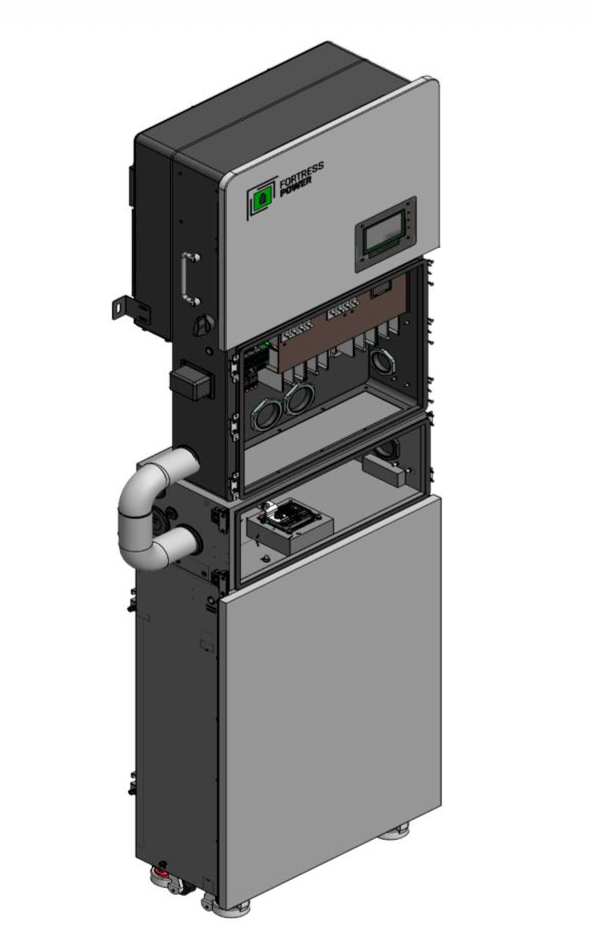
For energy storage installations that require additional battery capacity, installers can parallel two Fortress Power eWay Lites while maintaining a streamlined connection to a compatible Envy inverter.

The eWay Lite provides a simplified, more cost-effective alternative to the full eWay for parallel operation. However, its design differs in several important ways, so understanding the connection method, conduit options, cable requirements, and primary battery configuration can help installers plan the system before arriving on site.

What Is the Fortress Power eWay Lite?

The eWay Lite supports parallel operation while reducing some of the hardware found on the standard eWay. It features a single parallel port and does not include an integrated disconnect, back knockout openings, or top access for inverter stacking.

For an eWay Lite-to-eWay Lite configuration, two units can operate in parallel and feed a compatible Envy inverter, including the Envy 12K and Envy Duo 21/G.

This gives installers another configuration option when designing a Fortress Power energy storage system around the needs of the installation.

How Do You Parallel Two eWay Lites?

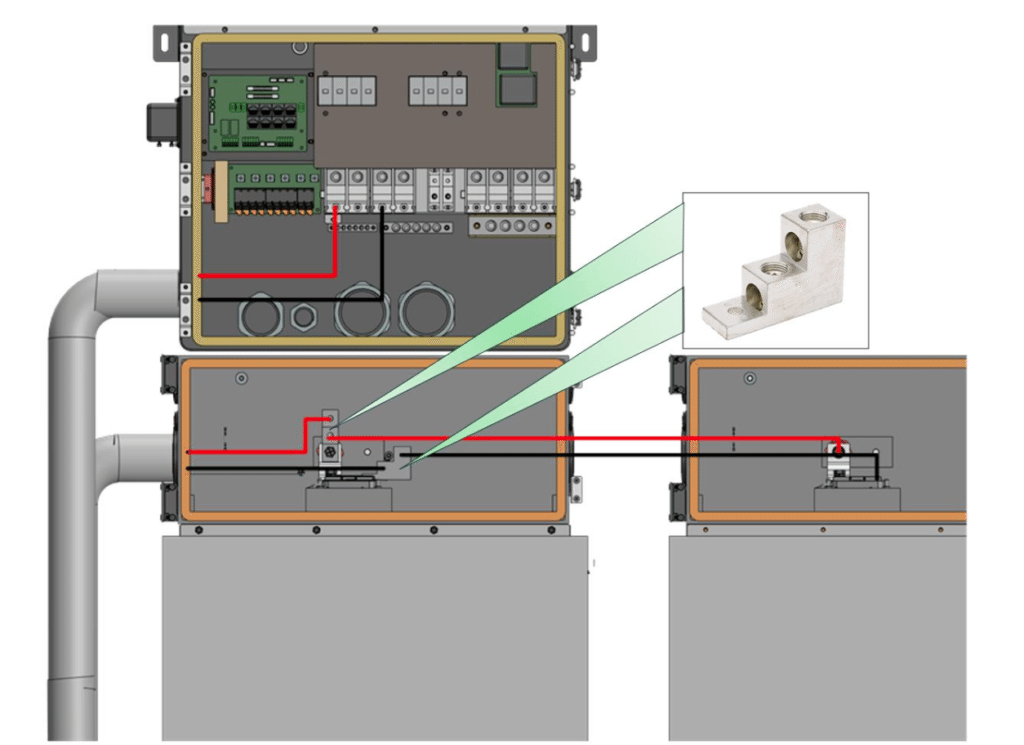
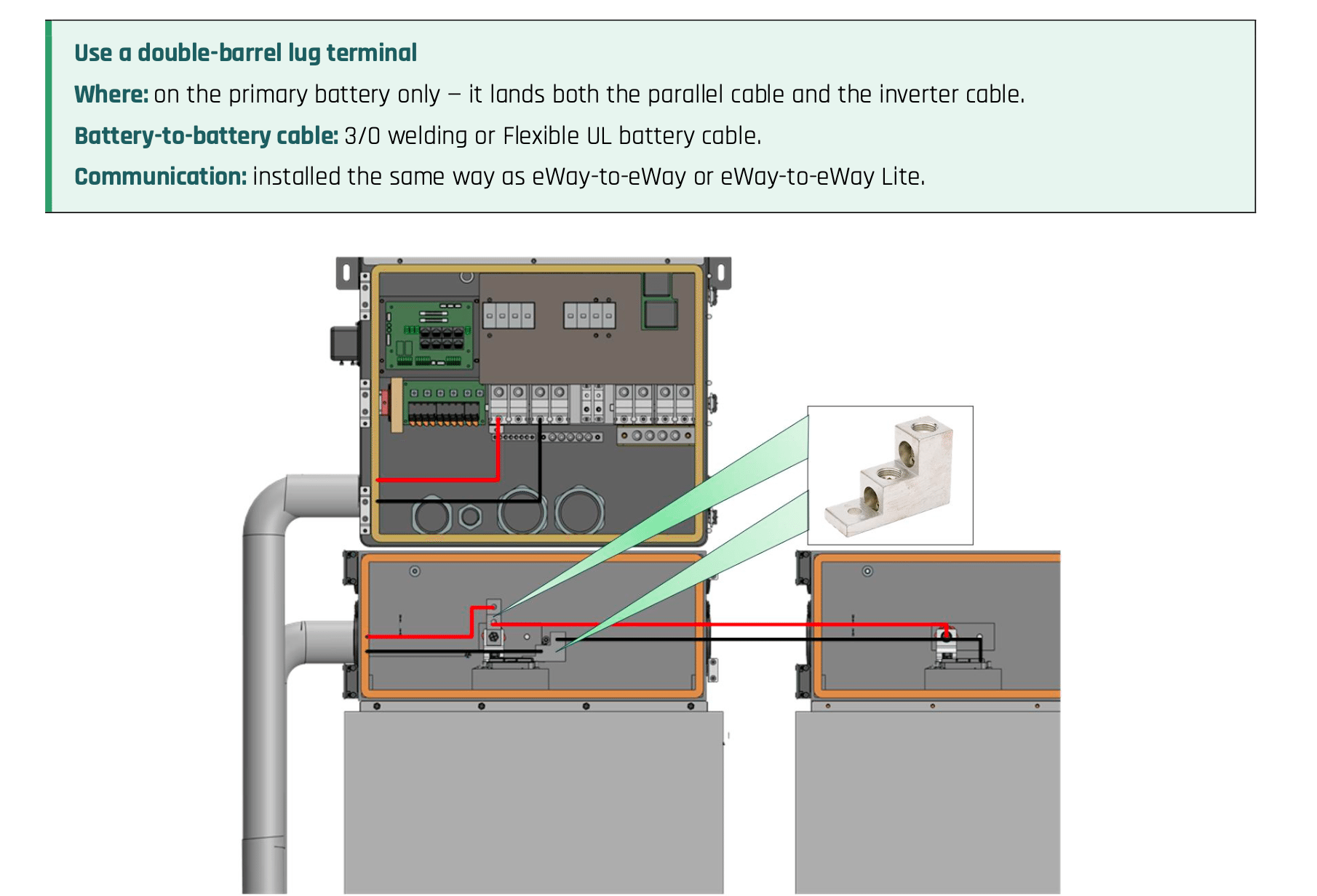
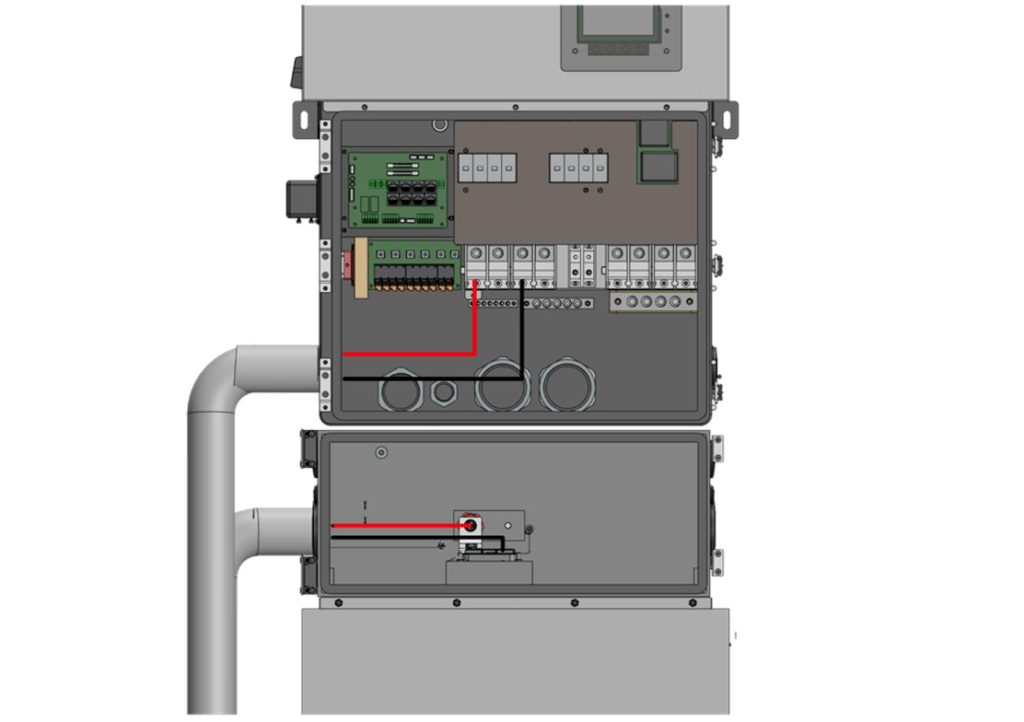
When paralleling two eWay Lites, one unit serves as the primary battery. The primary battery carries the mechanical lug that makes both electrical connections: one to the second eWay Lite and another to the inverter battery ports. A double-barrel lug on the primary battery allows the parallel battery cable and inverter cable to land at the same point. The basic connection sequence is:

  • Identify which eWay Lite will serve as the primary battery.
  • Install double-barrel lugs on the primary battery’s positive and negative terminals.
  • Run 3/0 cable from the second eWay Lite to one barrel of each lug.
  • Connect the inverter cables from the remaining barrels to the Envy inverter battery ports.
  • Install the parallel communication cable using the standard eWay-to-eWay communication method.
  • Torque each lug connection according to the lug manufacturer’s specifications.
  • The connection diagram in the Fortress Power technical note provides a visual reference for the primary battery, second eWay Lite, double-barrel lug, and inverter connection.

Flexible vs. Rigid Conduit for eWay Lite Installations

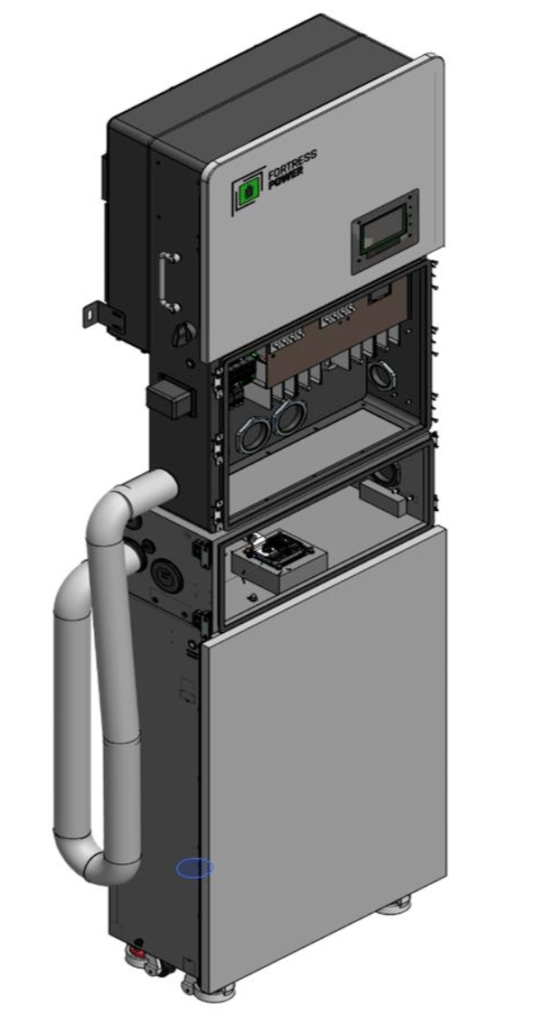
Installers have two approved conduit options for the connection between the eWay Lite and Envy inverter: flexible conduit or rigid conduit with a 90-degree bend. The right choice depends on the site conditions and local inspection preferences.

Flexible conduit accommodates the offset between the battery port and inverter without requiring a fabricated bend, which can make it the faster option in the field.

Rigid conduit provides a fixed, mechanically protected run. A 90-degree bend accommodates the offset while maintaining the required spacing between the eWay Lite and inverter. Regardless of the conduit method, installers should confirm the required spacing and select the appropriate knockout before routing cable.


eWay Lite Cable Requirements

Cable selection is another important part of the installation. Fortress Power specifies welding cable or Flexible UL battery cable for every DC run. Building wire should not be used as a substitute.

For the battery-to-battery connection between two eWay Lites, installers should use 3/0 welding cable or Flexible UL battery cable.

The eWay Lite also provides multiple knockout sizes to accommodate different conduit sizes. Installers should match the conduit to the knockout they plan to use before beginning the run.

What Should Installers Check Before Energizing?

Before energizing an eWay Lite-to-eWay Lite system, installers should verify the complete battery and inverter connection.

Confirm that the spacing meets the required clearance, the conduit matches the selected knockout, and all DC runs use the specified battery cable. The double-barrel lug should be installed on the primary battery with both cables properly landed and torqued.

Installers should also verify positive-to-positive and negative-to-negative polarity at every termination, confirm that the parallel communication cable is fully seated at both units, and inspect the installation for exposed conductors or damaged cable insulation.

Building Out an eWay Lite Configuration

Paralleling two eWay Lites gives installers another way to expand an eBoost system while maintaining a straightforward connection to compatible Envy inverters. With the right cable, conduit, spacing, and primary battery configuration planned ahead of time, installers can create a clean parallel setup that fits the needs of the system.

Have questions about eWay Lite configurations or designing your next Fortress Power system? Contact the Fortress Power team for support with system design and product selection.